
HUADO RGB Gaming Mouse Pad, 0.16 Inch Thickness, 31.5" x 11.8" Large Mouse Pad for Desk, 14 Ligh
$10.98
View on Amazon →

Published 17 September 2026 · updated 2026-09-17 · by GimmickHub
Most gaming accessories are designed to photograph well, not to improve your play. Gaming gadgets worth buying in 2026 are fewer than the market suggests: an extended mouse pad, a wired gaming mouse with native DPI, and a USB hub for port-limited consoles. Everything else is largely cosmetic.
We applied three filters to every product in this guide: a minimum 4.6-star rating, a price ceiling of £35 for accessories, and a clear functional purpose. If a product cannot answer the question of what specific problem it solves, it did not make the cut — regardless of how many LED strips it ships with. We also excluded any product that exists primarily as desk decoration, and did not factor in packaging or social media presence.
Our selection criteria:
The extended mouse pad is the most underrated gaming desk upgrade available. A small pad creates an inconsistent friction zone at the edges — mid-swipe, you hit a slower patch and tracking breaks down. A 31-inch or wider surface removes that variable, unifies keyboard and mouse on one consistent texture, and eliminates the bare-desk scraping noise that short sessions hide and long ones amplify.
The practical minimum for most setups is 31.5 inches wide by 11 to 12 inches deep — enough to cover a full-size keyboard and mouse side by side on a standard 47-inch desk without crowding. The HUADO RGB Gaming Mouse Pad hits this footprint at 31.5 x 11.8 inches with a 0.16-inch profile that sits flush under most keyboard trays without creating a raised step that disrupts wrist angle. The BladeHawks RGB Gaming Mouse Pad Extended matches those dimensions at 31.5 x 12 inches with 14 lighting modes and full-surface LED coverage from edge to edge.
For buyers prioritizing build quality, the ASUS ROG Sheath Gaming Mouse Pad uses anti-fray stitched edges — the detail that separates a £12 pad from a £25 one after six months of daily use, when budget options begin peeling at the corners. Its surface is also designed for pixel-precise tracking, which becomes relevant at higher DPI settings where minor surface texture variations affect cursor consistency.
Functionally, no — lighting does not affect tracking accuracy. What it provides is low-level ambient desk illumination without a separate lamp, which some users find reduces glare contrast in a dark setup. Both the HUADO RGB Gaming Mouse Pad (4.8 stars, £10.98) and the BladeHawks RGB Gaming Mouse Pad (4.7 stars, £14.99) deliver 14 lighting modes for under £15. The ASUS ROG Sheath Gaming Mouse Pad at £24.99 earns its premium through build durability rather than the lighting feature.
| Pad | Dimensions | Thickness | Lighting | Price | Rating |
|---|---|---|---|---|---|
| HUADO RGB Gaming Mouse Pad | 31.5 x 11.8 in | 0.16 in | 14 modes | £10.98 | 4.8 ★ |
| BladeHawks RGB Gaming Mouse Pad | 31.5 x 12 in | Not stated | 14 modes | £14.99 | 4.7 ★ |
| ASUS ROG Sheath Gaming Mouse Pad | Extra-Large | Not stated | ROG Aura Sync | £24.99 | 4.8 ★ |
The HUADO RGB Gaming Mouse Pad at £10.98 covers the practical needs of casual to serious gaming. Step up to the ASUS ROG Sheath only if you already own ROG peripherals with Aura Sync, or if stitched-edge durability from heavy daily use is your priority.
A gaming mouse upgrade makes a tangible difference when your current mouse is a standard office model — better glide consistency, more responsive clicks, and a grip shaped for longer sessions. The difference between a £6 office mouse and a £12 gaming mouse is meaningful. The difference between a £25 and a £60 gaming mouse is often marginal unless you compete daily.
The BENGOO Gaming Mouse Wired (4.6 stars, £11.99) delivers RGB backlighting, four adjustable DPI settings up to 3,600 DPI, and six programmable buttons. DPI up to 3,600 covers casual and mid-level competitive play comfortably. Six programmable buttons handles most game genres without the learning curve of a full macro layout.
The Redragon M602 Gaming Mouse Wired (4.6 stars, £17.99) steps up to 7,200 DPI and nine programmable buttons. The extra DPI range suits MMO players who rely on precise low-sensitivity control, high-resolution display users, and anyone who switches between gaming and creative work on the same mouse. At £17.99, it represents one of the stronger value cases in this category.
The Razer Basilisk V3 Customizable RGB Gaming Mouse (4.6 stars, £34.98) is marketed around its Fastest Gaming Mouse Switch and Chroma RGB lighting — both confirmed in the product title. The switch mechanism is the most important specification to verify in the full listing: look for whether it uses optical or Hall Effect actuation, as both eliminate the physical contact debounce delay of standard mechanical switches. For competitive FPS gaming where click timing is a measurable performance variable, that switch type is the purchase-justifying specification. For casual gaming, the BENGOO or Redragon M602 perform as well as you will notice at half the price or less.
Some budget gaming mice advertise high DPI figures that are interpolated rather than native — the firmware estimates cursor position mathematically instead of physically measuring it. Interpolated DPI creates tracking inconsistency at high sensitivity. Before buying any gaming mouse under £10 from an unfamiliar brand, check recent buyer reviews for mentions of native DPI or sensor accuracy. The BENGOO Gaming Mouse Wired and Redragon M602 both have sufficient review history to confirm consistent real-world tracking performance.
The PS5 Pro ships with a limited number of front-accessible ports that fill quickly — a controller charger, headset adapter, and external drive account for all of them at once. The USB Hub for PS5 Pro Console (4.7 stars, £18.99) adds five ports: three USB 2.0 and two USB Type-C, with Plug and Play installation that requires no drivers. It solves a specific, tangible port-shortage problem for under £20. Confirm you are buying the version designed for the PS5 Pro specifically, as USB expansion hubs are often shaped for a particular console generation and may not fit other models.
The Cableguys Disney Mickey Mouse Controller Holder & Phone Stand (4.7 stars, £29.93) holds a controller vertically off the desk surface, recovering desk width and preventing cable tangling around a flat-resting controller. The integrated phone stand supports dual-screen use without a separate mount. At 4.7 stars, build quality holds up under regular daily contact. The Disney Mickey Mouse styling is distinctly themed — it suits a playful or family gaming setup and looks out of place in a minimal or professional workspace.
A significant part of the gaming accessories market sells appearance over function. Skip these categories:
Worth buying if you:
Skip if you:
Five checks before adding anything to cart:
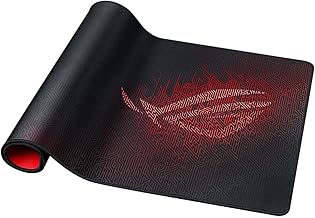


Yes, for anyone gaming more than an hour per session. A pad 31 inches or wider removes the friction inconsistency that occurs at the edge of a small pad mid-swipe, keeping tracking smooth across the full mouse travel range. The HUADO RGB Gaming Mouse Pad at 31.5 x 11.8 inches and 0.16-inch thickness proves the upgrade costs very little — under £11 for a pad that covers both keyboard and mouse on a standard desk.
Most FPS and third-person games play well between 400 and 1,600 DPI — precise enough for accurate aiming without making small hand movements oversized on screen. MMO players using multiple macro bindings often benefit from 3,600 DPI or higher. The Redragon M602 Gaming Mouse Wired covers up to 7,200 DPI for under £18, handling both casual and high-sensitivity competitive use cases without requiring a premium spend.
For casual gaming, no — the BENGOO Gaming Mouse Wired at £11.99 performs adequately. The Razer Basilisk V3 at £34.98 is built around its Fastest Gaming Mouse Switch claim, which typically indicates optical or Hall Effect actuation that removes the debounce delay of standard mechanical switches. That advantage is most noticeable in competitive FPS gaming. For daily competitive multiplayer, the Basilisk V3 is a defensible upgrade; for everything else, the budget options are sufficient.
It depends on how many peripherals you connect simultaneously. If you use a controller charger, external drive, and headset adapter at the same time, the PS5 Pro front ports fill up quickly. The USB Hub for PS5 Pro Console adds three USB 2.0 and two USB Type-C ports via Plug and Play for £18.99 — a practical buy for setups that regularly run out of ports, and unnecessary if you rarely use more than one front port at a time.
As an Amazon Associate we earn from qualifying purchases. Prices and availability are accurate as of the date shown and are subject to change — the price on Amazon at checkout is the one that applies.
Buying tech gifts under $50? Here's how to choose gadgets that genuinely get used every day — from audio to charging to desk kit.
The best car tech for UK drivers doesn't need to be expensive. Find out what to look for in phone mounts, tyre inflators, and car
The best desk setup upgrades for your home office: clamp lamps, monitor light bars, key specs and buying traps explained. UK price